
Like your favorite Pokémon, Slackbot has evolved! And what an evolution it is. We’ve rebuilt Slackbot from scratch to become a personal AI agent that transforms how employees get their work done. We’ve built it better, faster, stronger. And dare I say cuter?
Starting this month, Slackbot is available for Business+ and Enterprise+ customers through a phased rollout beginning now and continuing through January and February.
Using the context in your Slack workspace, Slackbot knows you, understands your business, and makes work a little more enjoyable. Slackbot also respects your data. It can only use information you have access to in your workspace and only acts within existing permissions.
Because Slackbot works where you work, it’s convenient, has all the context it needs to help you, and understands your needs and your company’s priorities. We’ve built it to be in alignment with our core values of trust, customer success, and innovation. Slackbot is future-ready and it’s our foundation for integrating with Agentforce and other employee agents across organizations going forward.
But like any new coworker, it takes time to learn how to work with it so you get the best results together.
So, how do we write better prompts? For Slackbot, you want a specific adventure that you can work on together. For Slackbot, prompts are the journey, not the destination.
First, specificity is your friend. Ask for a specific date range, be specific in what tone or length you need the information in, and give it context. Use positive examples, showing Slackbot what success looks like by including examples of the format, tone, or structure you want. This works much better than telling it what not to do.
Next, think of your project in steps. If you ask for everything all at once, you might find that Slackbot is less helpful. Instead ask Slackbot to help you brainstorm and iterate. Because sometimes the best prompts are the ones you’ve made along the way.
Finally, be ready to refine! Slackbot can be a great tool to help you revise, determine how to best speak to your particular audience, or even just help you get over that writer’s block. Yes, I speak from experience.
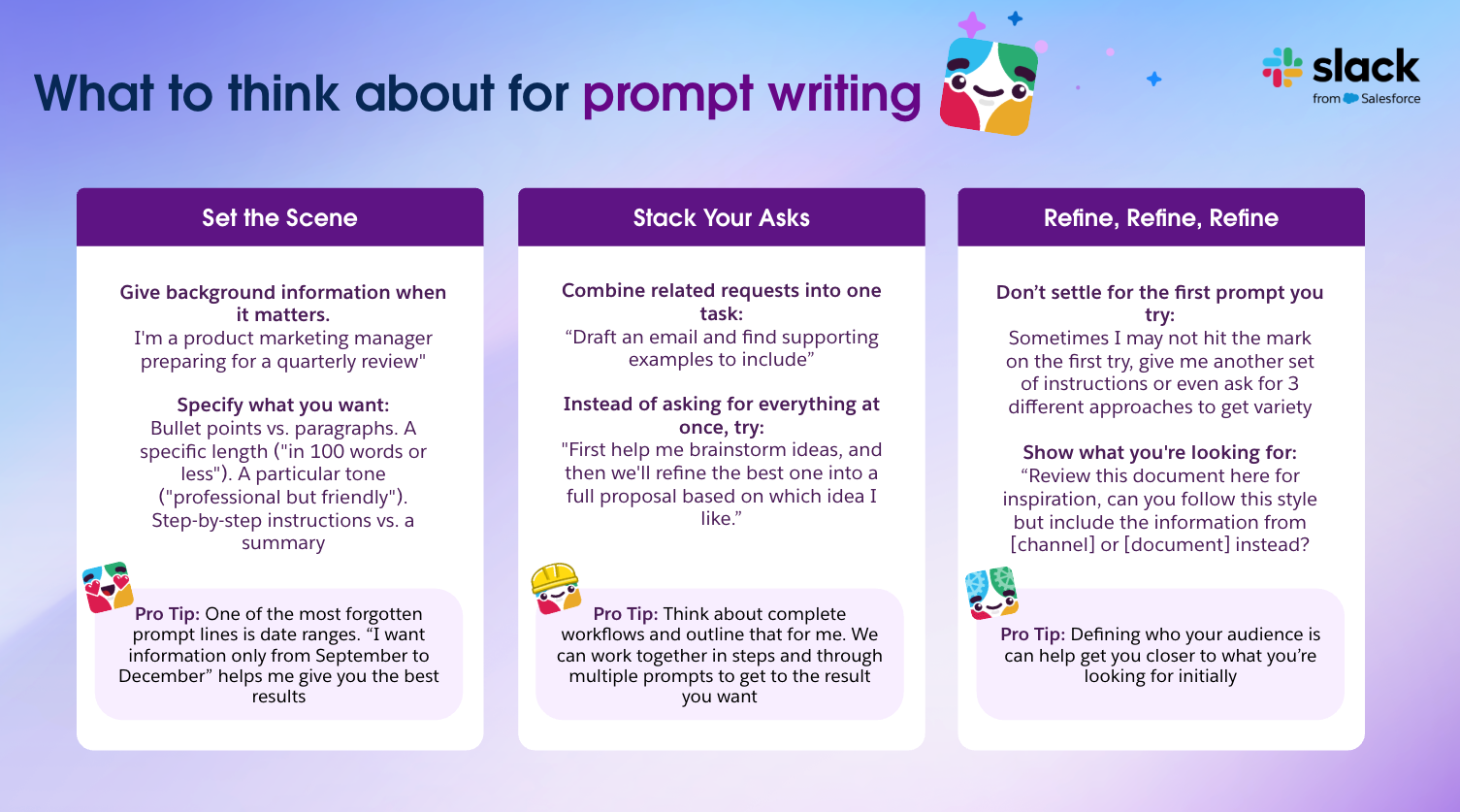
Here’s some prompts to get you started! Try them out and start on your journey to see all the ways Slackbot can help you work smarter and not harder.
- What DMs or mentions do I need to follow up on today? Show me anything that might need my action or response
- Find any messages where someone asked me a question but I haven’t responded yet
- What feature requests are coming up most often in customer-facing channels? Help me prioritize our backlog
- Review our recent incident discussions and identify patterns – what should we focus on to prevent similar issues?
- What are teams saying about our CI/CD pipeline performance? Summarize feedback and suggest improvements
To dive event deeper into the magic behind Slackbot, check out our official announcement post.