
When AI feels like a black box
You’ve seen it before. You send a message to an AI agent, and then… nothing. A spinner. A blank screen. And then — after what feels like forever — a fully formed response appears out of thin air. It works, technically. But it doesn’t feel great.
Users are left wondering: Is it still running? Did it get stuck? What just happened? There’s no visibility, no sense of progress, and no real collaboration.
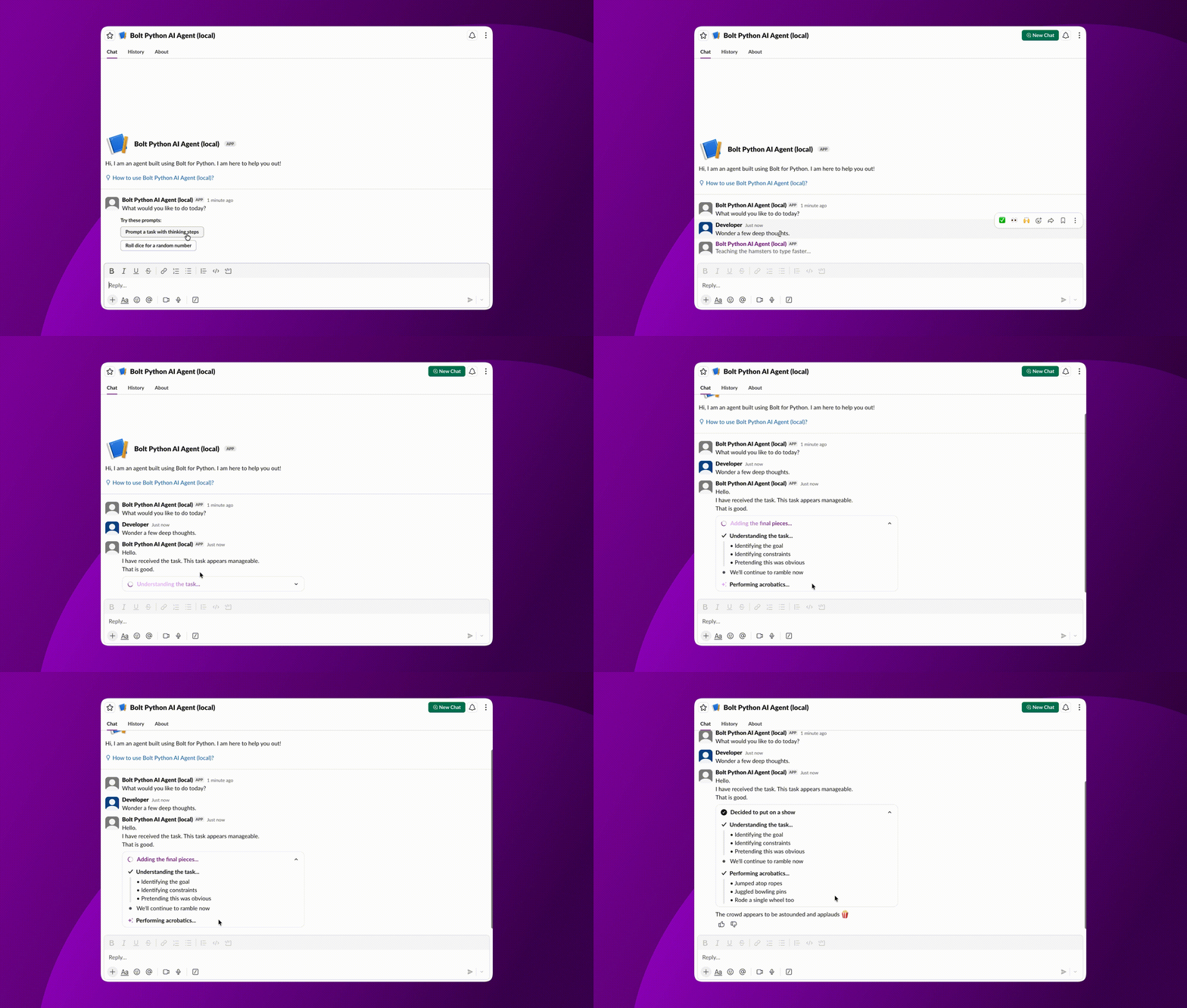
The best AI experiences today don’t just give you answers. They show you how they get there. You see the reasoning unfold in real time. It feels less like querying a system, and more like working alongside something that’s actively thinking with you.
Now, you can bring that same experience directly into Slack.
Introducing Thinking Steps
Thinking Steps is a new set of Block Kit elements and streaming APIs that lets your Slack app surface an AI agent’s reasoning process live in the conversation.Tool calls, task execution, and decisions, all visible as they happen.
Combined with Chat Streaming, Thinking Steps completes the picture: your agent can now show both what it’s doing and what it’s saying, in real time.
Two ways to display: Plan vs. Timeline
Thinking Steps supports two display modes, depending on how your agent works.
Plan mode presents a structured overview of tasks up front. This works well when your agent is laying out a multi-step approach before getting started. Like a to-do list that gets checked off as it goes.
Timeline mode shows tasks in a linear sequence as they happen. This is a better fit for agents that execute step by step and want users to follow along in real time.
Both modes are collapsed by default, so they don’t overwhelm the conversation. Users can expand them when they want to peek under the hood.
The building blocks
Thinking Steps introduces four new content types (“chunks”) that you can stream into a message:
📝 Markdown Text Block
Stream free-form text with full markdown support. Great for reasoning, summaries, or transitions between steps.
✅ Task Card Block
Represents a single action or tool call. Each card can include a title, status, and references. This is the core unit of Thinking Steps.
🗂️ Plan Block
A container for grouping Task Cards. Useful when your agent is executing a set of related actions and you want to present them together.
🔗 URL Sources Element
Attach references directly to a Task Card. When your agent pulls from external sources, you can surface those links inline, exactly where users expect them.
How it works
If you’re using Bolt, the easiest way to work with streaming (and Thinking Steps) is through the built-in helper:
const streamer = client.chatStream({
	channel: channel,
	recipient_team_id: teamId,
	recipient_user_id: userId,
	thread_ts: thread_ts,
});
This helper abstracts away the underlying streaming lifecycle, so you can focus on what your agent is doing — not how messages are managed.
Under the hood, Thinking Steps builds on the same streaming APIs used for Chat Streaming:
- chat.startStream → open a streaming message
- chat.appendStream → append content in real time
- chat.stopStream → close and finalize the message
Here’s what that looks like at a lower level:
// 1. Start the stream
stream = chat.startStream(channel, thread_ts)

// 2. Stream thinking steps as your agent works
chat.appendStream(stream.id, PlanBlock([
	TaskCard("Searching knowledge base...", status="in_progress"),
]))
chat.appendStream(stream.id, TaskCard("Searching knowledge base...", status="complete"))
chat.appendStream(stream.id, TaskCard("Drafting response...", status="in_progress"))

// 3. Stream the final response
chat.appendStream(stream.id, MarkdownTextBlock("Here's what I found..."))

// 4. Close the stream
chat.stopStream(stream.id)
It’s intentionally simple: open, append, close.
The complexity stays where it belongs: in your agent logic, not in how you integrate with Slack.
Get started quickly
Everything you need is available now in the Slack SDKs:
| SDK | Version | Release Notes |
| Node SDK | v7.14.0 | Release Notes |
| Python SDK | v3.40.0 | Release Notes |
| Slack CLI | v3.12.0 | Release Notes |
The fastest way to get started is with the Slack CLI and the AI Agent App template:
$ slack create
→ AI Agent App
 → Bolt for JavaScript
 → Bolt for Python
This gives you a fully working starter app with streaming and Thinking Steps already wired up.
Start building
Here’s everything you need to dive in:
- AI in Slack Apps guide
- Docs CHANGELOG
- Plan Block reference
- Task Card Block reference
- URL Source Element reference
- Python SDK Reference
- Node SDK Reference
Building great AI experiences isn’t just about the answer, it’s about helping users understand and trust how you got there. With Thinking Steps, you can make that visible.