
AI is changing how work gets done. Agents can summarize, generate, and recommend faster than ever. But there’s a gap.
Too often, agent responses still look like this: a long wall of text. Hard to scan. Hard to act on. Easy to ignore. And that’s the real problem, because intelligence alone isn’t enough. If users can’t quickly understand or act on what an agent produces, the value gets lost.
If you’ve built a Slack app before, you already know Block Kit, the layout system behind buttons, sections, modals, and more. It’s how you turn messages into experiences. Now, Block Kit is evolving for the agentic era.
We’re introducing five new components in the coming weeks: Card, Alert, Carousel, Data Table, Work Object, Code, designed to transform agent responses from static text into structured, interactive interfaces. All rendered natively across Slack (web, desktop, iOS, and Android), with no custom frontend required.
Whether you’re building an app, deploying an AI agent, or automating workflows, these components help you deliver something users can actually use, not just read.
What’s new in Block Kit
Card Block: structured, scannable context
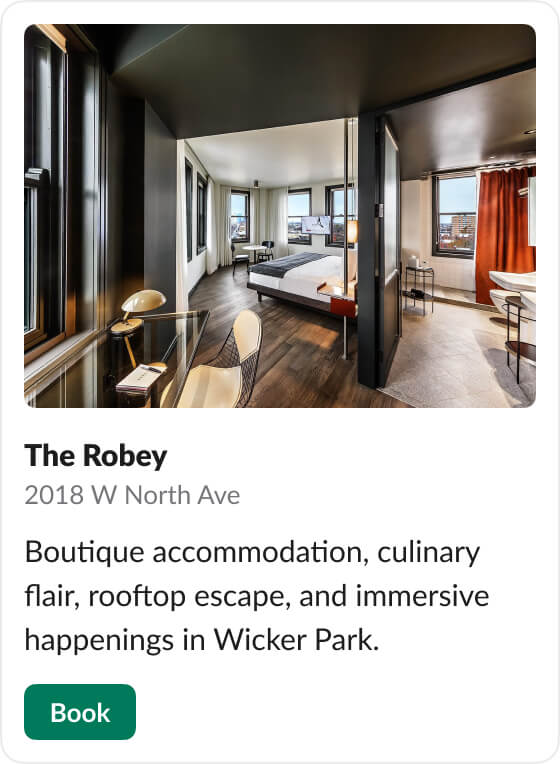
The Card block is your foundation for presenting information with clear hierarchy. It supports:
- An optional icon for quick recognition
- A required title and optional subtitle
- A hero image (4:3 ratio) for visual context
- A body section with formatted text
- Optional action buttons for immediate next steps
Cards are ideal for summarizing entities like contacts, tickets, or deployments. Especially when users need to quickly understand context and take action in one place.
Alert Block: communicate urgency clearly
Not every message should carry the same weight. The Alert block introduces visual severity, helping agents communicate urgency, confirmation, or risk without relying on dense text.
It supports five levels:
- Default for standard messaging
- Info for updates
- Success for confirmations
- Warning for caution
- Error for critical issues
Alerts expand naturally for longer content and support rich mrkdwn formatting (bold, inline code, links), making them ideal for drawing attention to what matters most without overwhelming the user.
Carousel Block: present options without overload
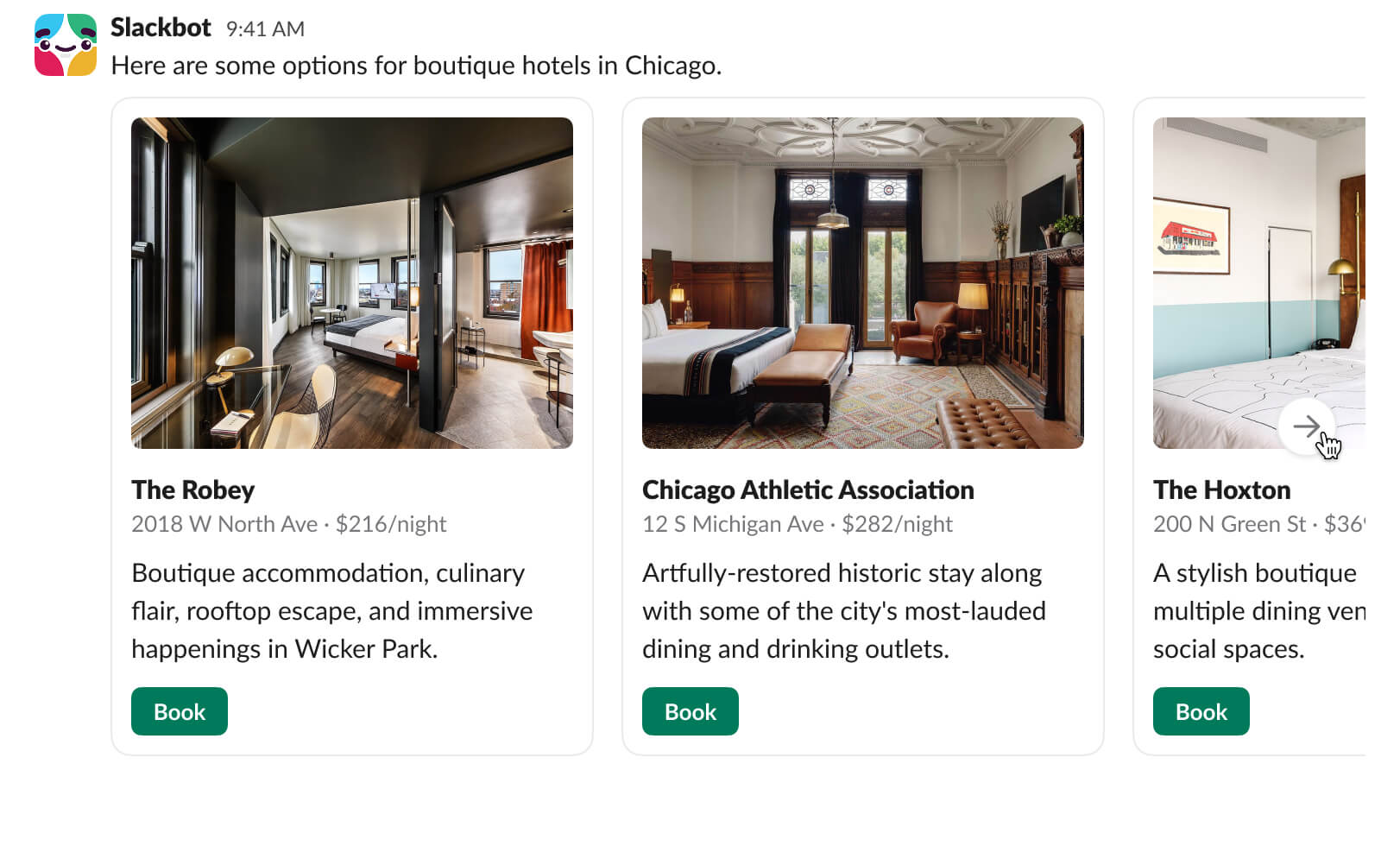
Agents often need to present multiple options: recommendations, results, or next steps.
The Carousel block lets you group up to 10 Cards into a horizontal, scrollable layout. Instead of flooding the message pane, you create a focused, browsable experience. Each card maintains a consistent layout, and navigation is built in. The result is simple: more choice, less clutter.
Data Table Block: bring structured data into the flow of work
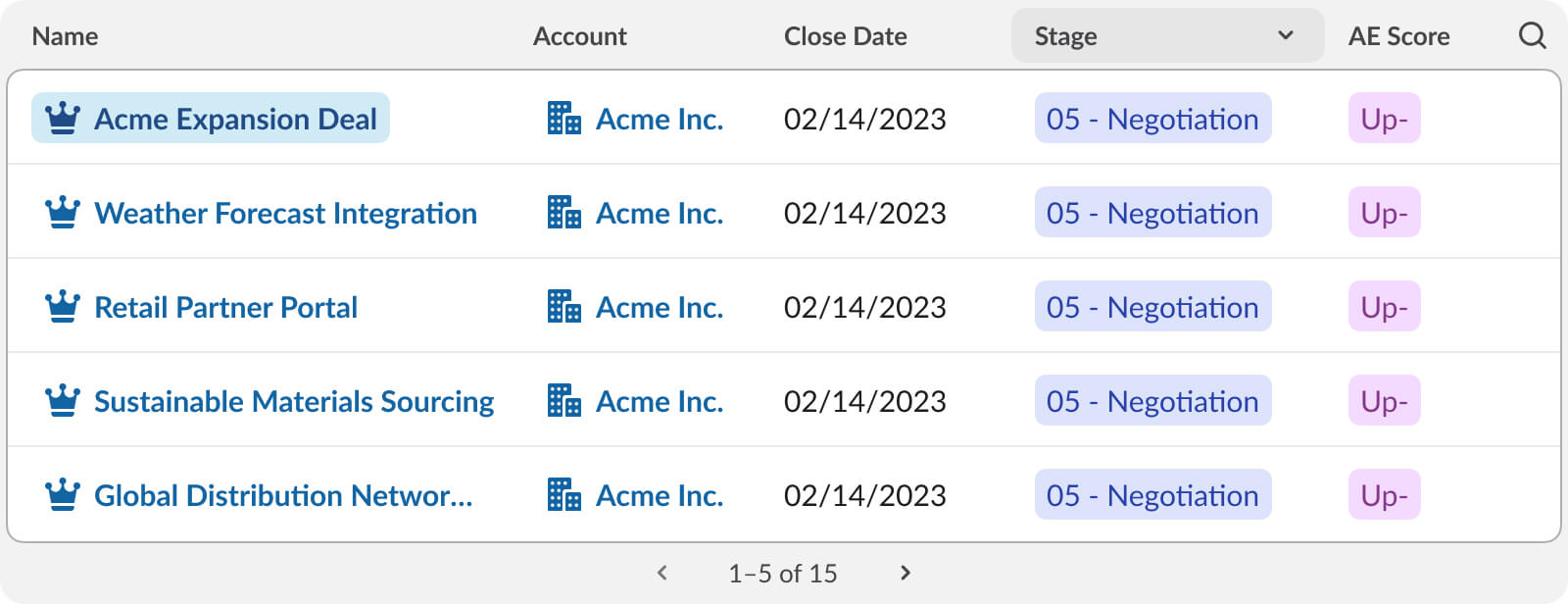
Data shouldn’t require context switching. The Data Table block allows agents to render structured, tabular data directly in Slack. No exporting to spreadsheets. No linking out to dashboards.
It becomes even more powerful when paired with Work Object Slugs and Work Object Unfurls (coming soon), enabling rows to link directly to records in systems like Salesforce or other tools. This means users can explore and act on data without ever leaving the conversation.
From messages to interfaces
Individually, these components are useful. Together, they change the nature of what an “agent response” can be.
Instead of returning text, agents can now assemble complete, task-oriented interfaces, right inside a conversation. Here’s what that looks like in practice.
Use Case 1: sales prep, in one message
A sales leader is preparing for an important call. Instead of jumping between CRM tabs, dashboards, and notes, they ask their agent for a summary.
The response includes:
- A Card highlighting the contact’s key details and recent activity
- A Data Table listing open opportunities with status and ARR
Within seconds, they review the context, click a button to schedule a prep session, and move forward—all without leaving Slack.
Use Case 2: keeping the dev lifecycle in flow
A developer asks an agent to generate code for a new feature. Instead of pasting code into external tools for review, the agent responds with:
- A Card summarizing the proposed change, author, and branch
- An Alert flagging a dependency conflict
- Action buttons to approve, request changes, or deploy
The team reviews everything inline, approves with a click, and the agent proceeds with deployment. No context switching. No fragmented workflow.
That’s the shift: these components don’t just improve how agents communicate, they enable users to act immediately.
Try it yourself
The fastest way to explore these new components is the Block Kit Builder, now updated to support them. You can compose, preview, and iterate on your layouts before writing any app code.
Here’s a simple example of a Card with action buttons:
{

 "type": "card",

 "card": {

   "title": {

     "type": "plain_text",

     "text": "Daily Standup Reminder"

   },

   "subtitle": {

     "type": "mrkdwn",

     "text": "Runs every weekday at *9:00 AM*"

   },

   "body": {

     "type": "mrkdwn",

     "text": "Last run: Today at 9:00 AM · Status: ✅ Success"

   }

 },

 "actions": [

   {

     "type": "button",

     "text": { "type": "plain_text", "text": "Edit" },

     "action_id": "edit_automation",

     "value": "automation_12345"

   },

   {

     "type": "button",

     "text": { "type": "plain_text", "text": "View Logs" },

     "action_id": "view_logs",

     "value": "automation_12345"

   }

 ]

}
And an Alert block for a warning level notification:
{

 "type": "alert",

 "alert": {

   "level": "warning",

   "text": {

     "type": "mrkdwn",

     "text": "*Dependency conflict detected* — `lodash@4.17.20` requires `^4.17.21`. Run `npm audit fix` before deploying."

   }

 }

}
Both blocks work today with Bolt for JavaScript, Python, and Java. Head to the Block Kit reference on docs.slack.dev for the full spec.
Start Building
Block Kit’s new components are rolling out now. Card, Alert, and Carousel are available today, with Data Table coming soon.
- Try the new blocks in Block Kit Builder
- Explore the full specification on docs.slack.dev
- Build end-to-end agents with Slack Agent Kit
The Slack platform has always been about bringing work into one place powering the most flexible, agent-first workspace. Now, with these new Block Kit components, your agents can meet users there, with experiences that are not just informative, but actionable.