

When someone installs your Slack app, they’re making a trust decision. They’re saying: “Yes, I want this app, and I’m okay with it accessing these parts of my workspace.” But what happens when your app asks for permissions they’re not comfortable with? Too often, they just… don’t install it. And you never even get a chance to show them the value.
That’s the problem optional scopes solve.
The permission problem
OAuth scopes are how your Slack app declares what it needs access to. Historically, it’s been all or nothing. Users either accept every scope your app requests, or they walk away. For apps with a broad feature set, that can mean asking for permissions that only power a subset of features, which, honestly, can feel like a big ask for someone who just wants the basics.
The result? Higher installation abandonment. Lower trust. Fewer users.
Enter optional scopes
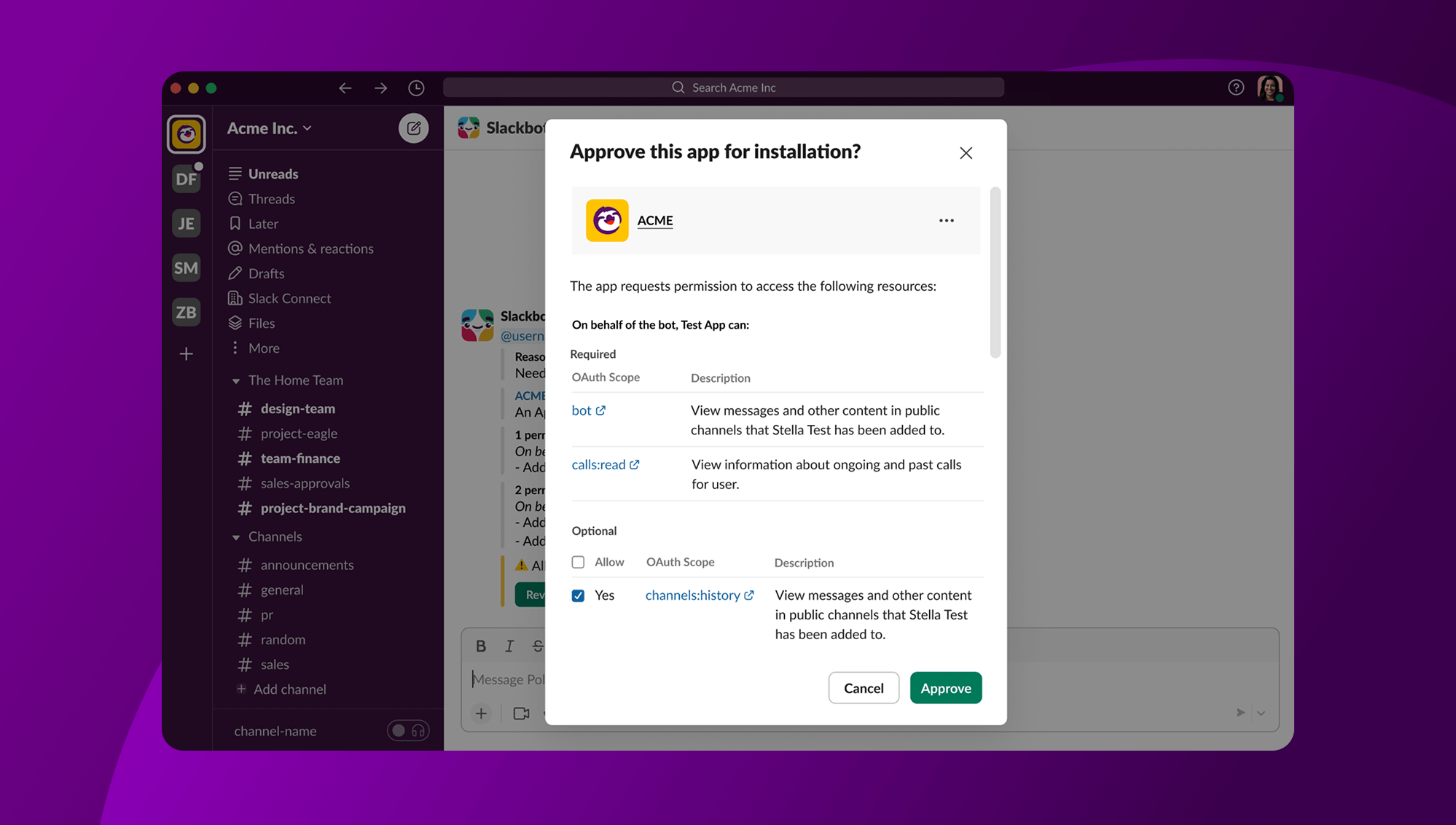
Optional scopes let you designate certain permissions as optional during app configuration. When a user installs your app, they see which scopes are required (non-negotiable for the app to function) and which are optional (needed only for specific features they may or may not want).
Users get to make an informed choice. Your app gets installed more often. Everyone wins.
Setting it up
There are two ways to mark scopes as optional:
Via the App Management Page
Head to Apps Settings page and open your app’s OAuth & Permissions settings. You’ll see a checkbox next to each scope. Simply uncheck the ones you want to make optional. That’s it.
Via App Manifest
If you manage your app configuration as code (and if you’re not yet—you probably should give it a go), add optional scopes to the new bot_optional or user_optional fields in your oauth_config:
"oauth_config": {
   "scopes": {
       "bot": ["chat:write", "commands,reactions:write"],
       "bot_optional": ["reactions:write"],
       "user": ["channels:history,reactions:read"],
       "user_optional": ["reactions:read"]
   }
}
Optional scopes must be a subset of your declared bot or user scopes respectively. Think of the required scopes as the full list, and optional scopes as the ones users can opt out of.
Building an app that handles it gracefully
Here’s the important part: once you introduce optional scopes, your app needs to be ready for users who don’t grant them. You’re giving users a choice, your app needs to respect it. An app that crashes or throws errors when an optional permission is missing defeats the whole purpose.
If you’re building with the Slack MCP Server, some of this comes built in. MCP only exposes the tools a token has permission to use, which means your agent won’t attempt actions it doesn’t have access to in the first place. That reduces the need for manual scope handling in many cases.
There are a few patterns you’ll want to build into your app:
- Graceful degradation
When a user hasn’t granted an optional scope, your API calls may return a missing_scope error. Catch these errors explicitly and respond gracefully. Maybe show a prompt explaining what the feature requires and how to enable it, rather than a broken experience. - Token scope storage
When a user completes the OAuth flow, the oauth.v2.access response includes the list of scopes that were actually granted. Store these. They’re your source of truth for what that user has authorized. - Feature gating
Before rendering a feature that requires an optional scope, check whether that scope is in the stored grant list. If it’s not there, hide the feature or show an upsell prompt — don’t let users hit a wall mid-workflow.
Think of optional scopes as progressive enhancement for your app. The core works for everyone; richer features unlock for users who opt in.
A note for workspace admins
If your app is installed in organizations with app approval workflows, workspace admins have an important role here too. When approving an app, admins now control the superset of optional scopes their users can choose from.
Required scopes are auto-approved as always. Optional scopes show up as checkboxes. Admins decide which ones are on the table, and users can choose from within that set. This gives organizations fine-grained governance without blocking productivity which, as you can imagine, is a big deal for larger teams.
Admins can manage approvals from the App Management page or directly from the SlackBot DM request.
What users see
From the end user’s perspective, optional scopes make the install experience feel more respectful. Instead of a take-it-or-leave-it list of permissions, users see a clear distinction between what the app needs and what it would like.
They’re in control.
As a developer, your job is to honor that choice. If a user opts out of an optional scope today, make it easy for them to enable it later if they change their mind. But don’t make opting out feel like a penalty.
Get started
Optional scopes are available now. Here’s what to do:
- Review your app’s scopes and identify which ones are truly optional
- Mark them optional via the App Management page or your App Manifest
- Update your app to store granted scopes from
oauth.v2.access - Add
missing_scopeerror handling and feature gating throughout your code
For the full details, check out:
Building apps users trust starts with asking only for what you need, and letting users decide the rest. Optional scopes make that possible.
Go build something great!