

Capturing the voice of your customers is always a good idea in the world of software. Your users should help shape your product and what they have to say is a potential goldmine of insights — but only if you can capture it before it disappears into the digital void.
The Problem: Feedback Gets Lost
Does this sound like your team? A customer mentions a brilliant feature idea in your #support channel. Someone drops a bug report in #general. A user shares praise for your latest update in #product-feedback. And by next week, half of it’s forgotten, and the other half lives in someone’s mental notes that never make it to your product roadmap.
The Solution: Automation That Actually Works
With Slack’s Workflow Builder and Google Sheets connector, you can create a feedback pipeline that captures everything automatically. Here’s how:
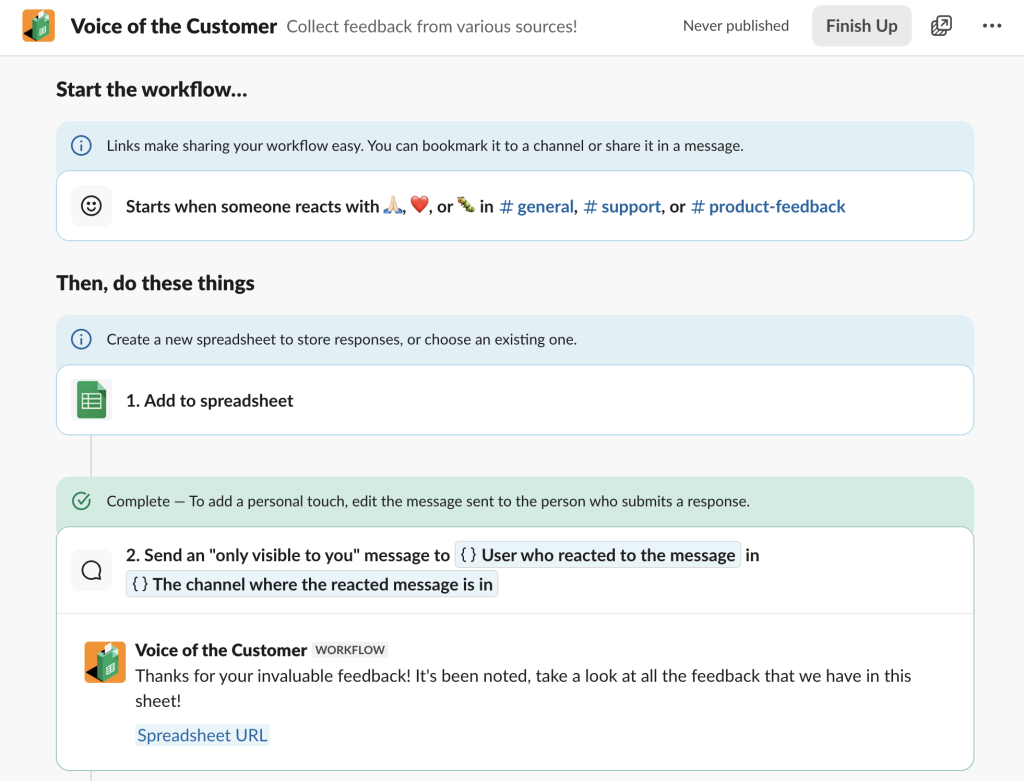
Step 1: Set the Trigger
Create a workflow that activates when team members add specific emoji reactions to messages — like :pray: for feature requests, :bug: for issues, or :heart: for positive feedback.
Step 2: Capture the Context
The workflow automatically grabs the following information and puts it into a Google sheet.
- The original message content
- Who posted it and when
- Which channel it came from
- The type of feedback (based on the emoji used)
Step 3: Organize Instantly
Send a message to let the user know that the workflow executed smoothly and then you can analyze the data to your heart’s content. No hunting through chat history, definitely no manual data entry and best of all no missed insights!
What this means for you and your team:
- Zero missed feedback: Every customer comment gets captured, categorized, and logged
- Faster response times: Product teams can see insights immediately
- Better decision-making: Having all feedback in one searchable database makes patterns obvious
- Improved customer relationships: When customers see their suggestions implemented, they know you’re listening
The beauty of this automation is its simplicity. You can set it up in under 5 minutes using Workflow Builder — no coding required!
Start small: pick one feedback type and one channel where you get the most feedback. Test it for a week and once you and your team see the magic happen, expand to cover all your customer touchpoint channels.
It doesn’t have to stop here! Does your team also use Asana for tracking tasks? Add the Asana connector to your workflow and automatically create a task in Asana for all your tracking needs. Perhaps JIRA is more your game, there’s a connector for that too – Salesforce, Dropbox, Smartsheet, the list goes on and on. If there isn’t a connector for it, you can create your own. Your workflow can be customized to however you like and use the tools that you need to get work done.
Remember, your customers are already sharing a treasure map full of feedback to help you build better products. The question isn’t whether the insights are there — it’s whether you’re capturing them before they slip away.