
Remember when you had to click a link to see where it led? You don’t? That’s because technology has improved beyond the old point and click days to interactive previews. We’ve come to expect that from our working experience, both in and out of Slack.
Back in the day, I worked with someone who thought it was great fun to edit a link URL to send me to a different link than expected. I never knew if I was going to get a Jira ticket or the Rick Astley video on YouTube (if you know you know*).
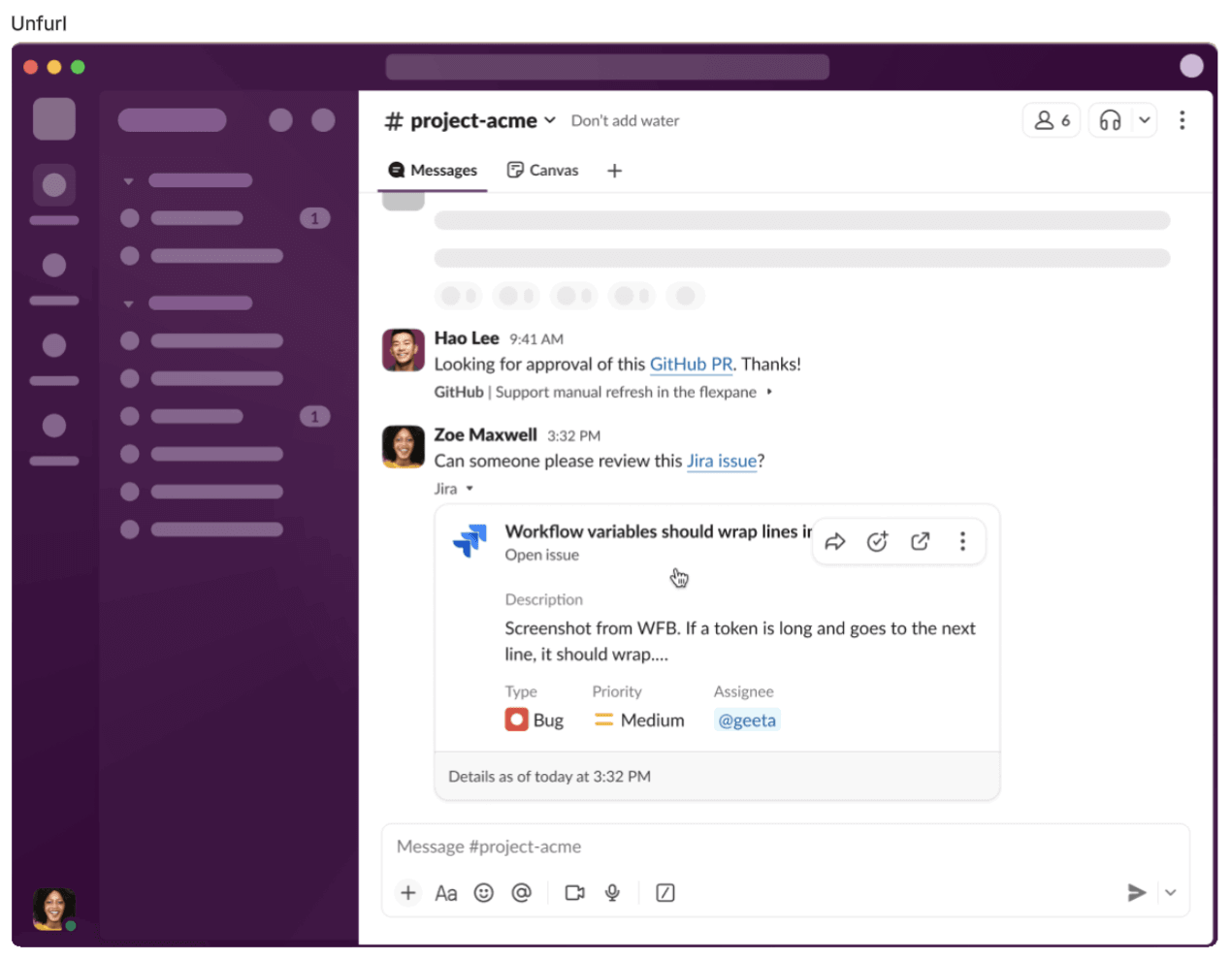
When Slack introduced unfurl links and cards, it changed the way I worked. I could see what the links were at a glance without having to mouse over them. I no longer had to triple check the links and I could just stay in the flow, click the link, and get to work. With unfurled links and cards, there was much less pranking and much more coding.
I doubt the folks at Slack knew how much time they’d saved me with just this small change, but needless to say, I was a big fan. Also I recently learned that the YouTube link to the aforementioned video purposefully doesn’t unfurl in Slack. You would not believe how happy I am about this. Or maybe you would.
However Slack has done something even more helpful and more awesome. Slack has gone beyond the cards with a major shift in how we integrate external systems (not just links!) with Slack. We now have Work objects, which help me get work done better with fewer clicks, better previews, and fewer unnecessary diversions.
Work objects provide all the unfurly goodness I’ve come to expect, but now they do even more. Now I can have quick access to files, tickets, and tasks with rich previews. Instead of having to context switch and click through the link, the preview shows me what it’s about, often with action buttons.
I’m a huge fan of those buttons by the way. They let me edit, approve, or otherwise take action in Slack and keep going with my day. Work objects also keep conversations connected, making it easier to keep track of who said what and where. No more crosslinking to external docs, tickets, or other resources that can get easily lost. Searching in Slack is great, but trying to remember what to search for is less so.
And now the addition of Work objects helps me search better. They enable the search bar to find information not only in Slack but also across connected external systems. Because they’re searchable, I no longer have to try to remember on my own.
One too many times I’ve wasted time trying to figure out where I had that conversation about that one Google doc somewhere that I edited that one time… where was it again? You get the idea.
So as a developer-user, this is amazing. I can keep the conversation going in Slack but also keep track of any app that we’ve integrated into our workspace. I can see what’s up with my tickets, at a glance to see what comments have been made on my PRs, see if my boss has approved my time off request, and be able to search across connected systems for the information I need. Work objects are also fully functional on mobile, so I can get the information I need wherever I am.
I can also add Work objects in my own apps to enable users to make the most use out of them. I don’t want users to feel any frustration with my app, and this helps reduce that as well as the friction of context switching. This way any frustration they feel can be entirely my fault. Yay? Yay!
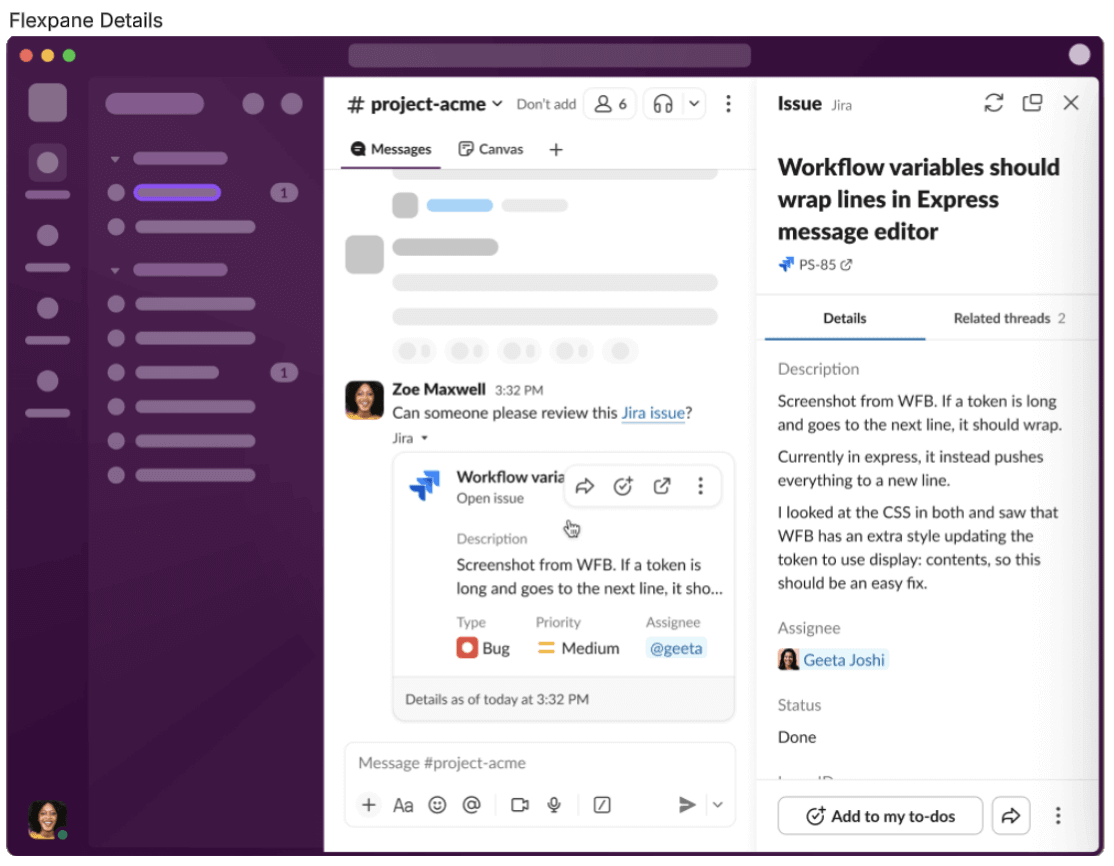
To make this happen, the API integration is simple and does a lot of the work for me with a new method for flexpane (entity.presentDetails) and a new event (entity_details_requested). This may make it sound too simple, but the simplicity is in the integration, not in what I can do with it. I can do so much with the unfurl component and the flexpane component.
The unfurl lets the viewer preview a wealth of information, whether it be a file, task, incident, content item, etc. The etc is the `Item` entity type, which can represent anything, so literally etc.
With the flexpane, I can add an additional layer of rich contextual information as well as customization. I can also add authorization to make sure the users accessing the flexpane are authorized to, keeping sensitive information secure.
As you can tell, there’s so much more to this than I can cover in a blog post. There are already over 300 apps using Work objects to build the future of connected workspaces.
You could say that this future is significantly more rich and significantly less… Rick. (Sorry not sorry).
*If you don’t know what I’m talking about, here’s the Wikipedia page on it. And yes the link goes to Wikipedia, promise.